Hello and welcome to Scratch 101! In this tutorial we will be creating a game with a Christmas theme.
Objective:
To create a fully fledged game.
Graphical Setup:
The graphical template is located here: https://scratch.mit.edu/projects/137406196/
Scripts:
This goes into the "santasleigh" sprite:
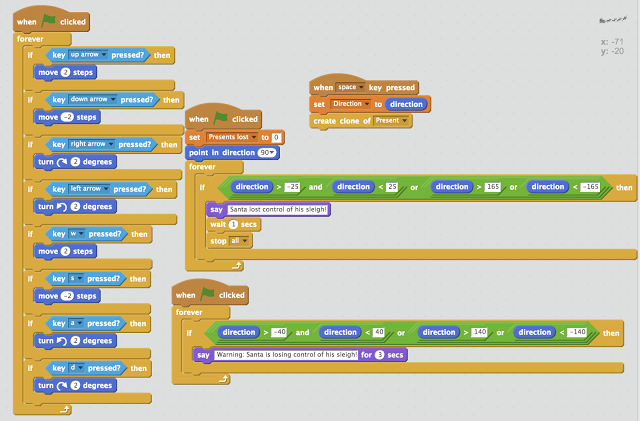
This goes into the "present" sprite:

This goes into the "house" sprite:
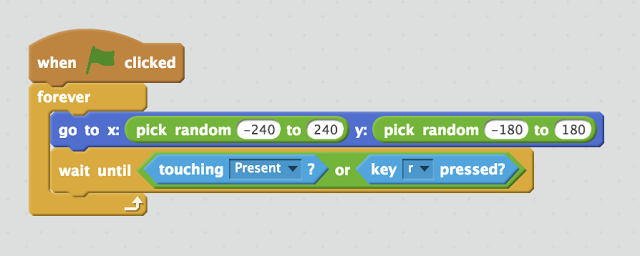
Common Mistakes:
Make sure that you type in the correct numbers
Make sure that you have set all of your variables, inputs and logic gates set correctly and applied properly!
The completed version can be found here: https://scratch.mit.edu/projects/137353234/#player
LOL K00L not BaId
ReplyDeleteThis looks like a fun starting point for game creation! Learning to build a full game, even a Christmas-themed one, is a great objective. It reminds me of the excitement of discovering speed stars for the first time.
ReplyDeleteThis is such an inspiring post! Seeing people dive into game creation, especially with a specific theme like Christmas, really gets me motivated. It's that feeling of building something from scratch, you know? It reminds me a bit of the satisfaction I get from finally nailing a tricky level in games. Speaking of which, I've been spending a lot of time lately playing Drive Mad – it's surprisingly addictive for a simple physics game! What's one game development concept you're most excited to explore?
ReplyDelete